קבלו את כל 11 הקורסים ב-$44.90 בלבד
מאפס לפרו בשבועיים. השתמשו בקוד קופון ל-10% הנחה — רק $40.90 לגישה לכל החיים.
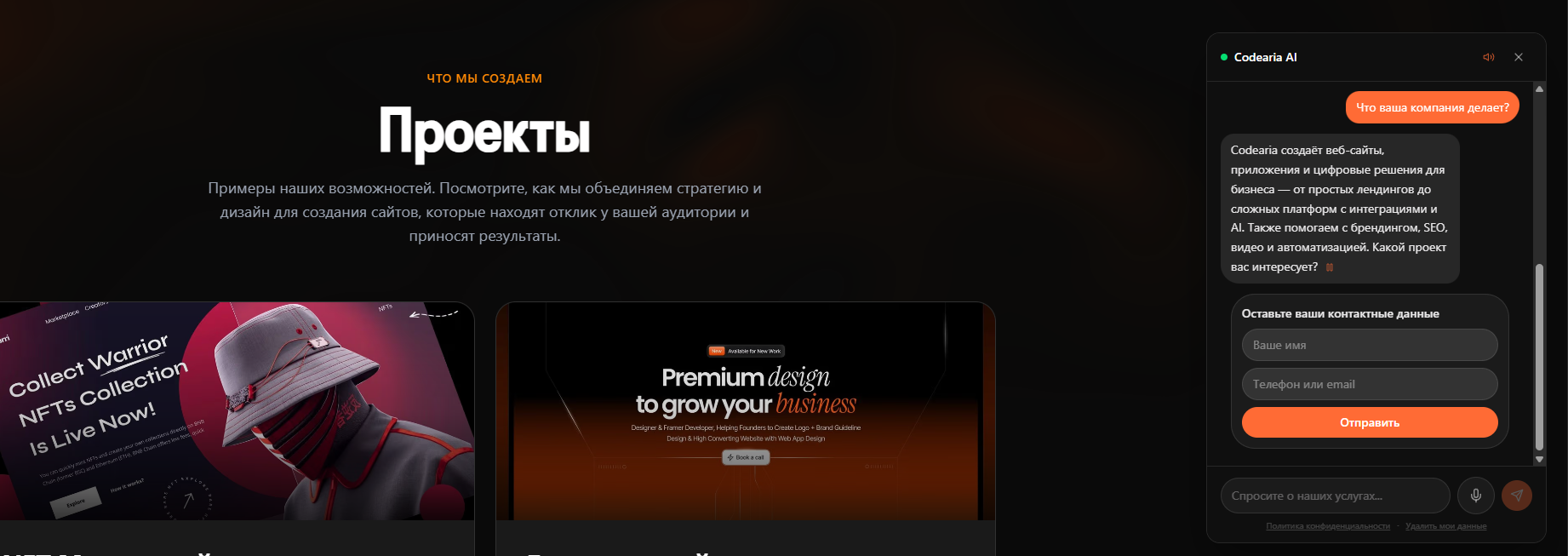
עוזר AI לאתר שלכם
צ'אטבוט חכם שמקבל מבקרים, עונה על שאלות, ממליץ על מוצרים והופך שיחות ללידים — 24/7, ללא מפעילים.
עוזר ה-AI מעורב מיידית עם כל מבקר בשיחה טבעית. הוא מבין הקשר, עונה על שאלות לגבי מוצרים, מציע המלצות מותאמות אישית ואוסף פרטי קשר — ואז מעביר לידים חמים לצוות שלכם בזמן אמת.
מבוסס על נתונים אמיתיים מפריסות לקוחות.
כיצד זה עובד
מבקר פותח צ'אט
הווידג'ט נטען באתר שלכם ומקבל את פני המבקר עם הודעת פתיחה מותאמת לדף הנוכחי.
AI מעבד את ההודעה
Claude AI מנתח את השאלה, מושך מידע רלוונטי ממאגר הידע ויוצר תגובה טבעית ועקבית עם המותג.
לוגיקת ההמרה נכנסת לפעולה
לוגיקת מכירות מובנית מזהה כוונת רכישה ומנחה בעדינות את המבקר להזמנה או להשארת פרטי קשר.
העברת ליד לצוות
לידים חמים מועברים מיידית ל-CRM, Telegram או אימייל — עם תמליל השיחה המלא.
דשבורד אנליטיקס
עקבו אחר שיעורי המרה, זמני תגובה, שאלות נפוצות ו-ROI בדשבורד בזמן אמת שנבנה למקבלי החלטות.
שיפור מתמיד
המערכת לומדת מכל שיחה. תוכלו לכוונן תגובות, להוסיף שאלות נפוצות ולהתאים את תסריט המכירה בכל עת.
רוצים להעמיק?
הקורסים המובנים שלנו מכסים מושגים אלה לעומק — עם פרויקטים מעשיים, דוגמאות קוד והדרכה צעד אחר צעד.
יתרונות מרכזיים
בנו בעצמכם
11 קורסים למתחילים ולא רק — מאפס לפרו בשבועיים.
רוצים להעמיק?
הקורסים המובנים שלנו מכסים מושגים אלה לעומק — עם פרויקטים מעשיים, דוגמאות קוד והדרכה צעד אחר צעד.
ארכיטקטורת קבצים
מבנה פרויקט נקי וסקלבילי. לכל קובץ יש תפקיד — API routes ל-AI, קומפוננטות לממשק הצ'אט ו-lib ללוגיקה עסקית.
my-ai-assistant/
├── app/
│   ├── api/
│   │   └── chat/
│   │       └── route.ts          # נקודת קצה AI עם streaming
│   ├── layout.tsx
│   └── page.tsx
├── components/
│   ├── ChatWidget.tsx            # קומפוננטת צ'אט צפה
│   ├── ChatBubble.tsx            # ממשק בועות הודעות
│   └── TypingIndicator.tsx       # אנימציית הקלדה
├── lib/
│   ├── ai.ts                     # הגדרות Claude SDK
│   ├── knowledge.ts              # RAG ומאגר ידע
│   └── leads.ts                  # לוגיקת לכידת לידים
├── prisma/
│   └── schema.prisma             # סכמת מסד נתונים
├── .env.local
├── package.json
└── tailwind.config.ts
קטעי קוד מרכזיים
אתם לא חייבים לדעת תכנות — פשוט העתיקו והדביקו את הקוד למטה לתוך הפרויקט שלכם.
רוצים להבין איך זה עובד? קחו את הקורס שלנו Claude Code Mastering →
import { anthropic } from '@ai-sdk/anthropic';
import { streamText } from 'ai';

export async function POST(req: Request) {
  const { messages } = await req.json();

  const result = streamText({
    model: anthropic('claude-sonnet-4-20250514'),
    system: `You are a helpful sales assistant...
      Be friendly, answer product questions,
      and help customers find what they need.`,
    messages,
  });

  return result.toDataStreamResponse();
}'use client';
import { useChat } from 'ai/react';
import { Bot, Send, X } from 'lucide-react';
import { useState } from 'react';
export default function ChatWidget() {
const [open, setOpen] = useState(false);
const { messages, input, handleInputChange,
handleSubmit, isLoading } = useChat();
// ... floating button + chat window
}# Anthropic API Key
ANTHROPIC_API_KEY=sk-ant-...
# Database (PostgreSQL)
DATABASE_URL=postgresql://user:pass@localhost:5432/ai_bot
# App URL
NEXT_PUBLIC_APP_URL=http://localhost:30005 פקודות להשקה
מאפס לצ'אטבוט AI עובד בפחות מ-10 דקות. פשוט הריצו את הפקודות האלה בטרמינל.
צרו פרויקט Next.js חדש עם TypeScript ו-Tailwind
npx create-next-app@latest my-ai-bot --typescript --tailwind --appהתקינו את Vercel AI SDK ואת ספק Anthropic
cd my-ai-bot && npm install ai @ai-sdk/anthropicהוסיפו ספריות UI: אנימציות, אייקונים ו-ORM למסד נתונים
npm install prisma @prisma/client framer-motion lucide-reactאתחלו את מסד הנתונים והריצו מיגרציות
npx prisma init && npx prisma migrate devהפעילו את שרת הפיתוח ופתחו localhost:3000
npm run devטיפים לפרומפט מערכת
רשימת בדיקות לפריסה
משתני סביבה
ANTHROPIC_API_KEY, DATABASE_URL ו-NEXT_PUBLIC_APP_URL חייבים להיות מוגדרים אצל ספק האחסון.
מיגרציות מסד נתונים
הריצו prisma migrate deploy ב-CI/CD pipeline לפני הפעלת האפליקציה.
CORS ואבטחה
הוסיפו את הדומיין שלכם לרשימה הלבנה ב-API route. הוסיפו headers להגבלת קצב.
הגבלת קצב
הגבילו קריאות API ל-20 לדקה לכל IP למניעת שימוש לרעה ושליטה בעלויות.
ניטור והתראות
הגדירו מעקב שגיאות (Sentry) והתראות על הוצאות API.
שיחות בדיקה
בצעו 20+ שיחות בדיקה המכסות מקרי קצה לפני ההשקה.
מחסנית טכנולוגית
תוצאות מוכחות
מדדים אלה מבוססים על פריסות אמיתיות עבור עסקי e-commerce ושירותים. התוצאות עשויות להשתנות בהתאם לתעשייה, התנועה וקטלוג המוצרים שלכם. אנו מתאימים כל עוזר לקול המותג ולמטרות העסקיות שלכם.
מוכנים לבנות מערכות AI אמיתיות?
המדריך הזה הוא רק ההתחלה. הקורסים שלנו לוקחים אתכם מאפס לפרודקשן — עם תכנית לימודים מובנית, פרויקטים מעשיים והדרכה מקצועית.
תגובות