Claude Code Statusline: Know Everything Without Typing /status
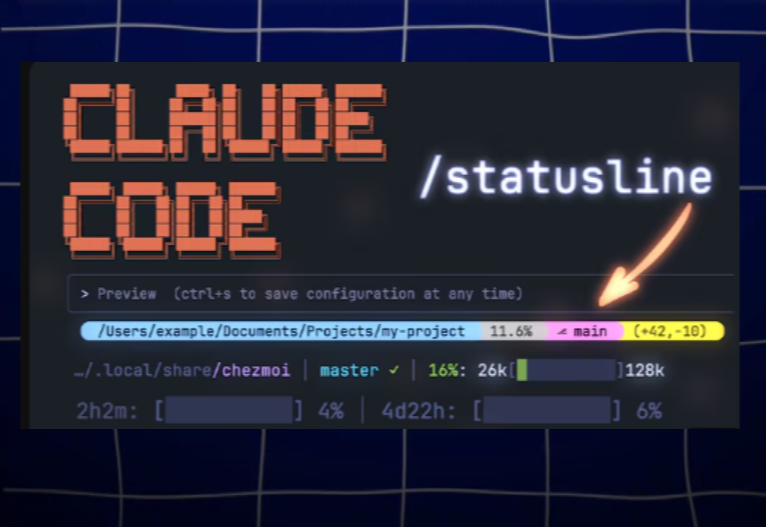
Most developers type /status five times an hour — just to remember which model, which branch, how much context is left. One config replaces all of it. This guide shows the smart status bar that surfaces model, tokens, usage limits, and mode — all in one always-visible line.
What's Inside
Free · 5 min readYou Type /status More Than You Think
Default Claude Code shows almost nothing. Every check costs a turn, every guess costs a token, and the limits you can't see are the ones that stop you mid-task.
Blind by default
The built-in bar shows model and a tiny progress hint. Branch, mode, real token count, usage limits — all hidden. Each /status call costs a turn and breaks your flow.
Limits sneak up
Anthropic limits hit at 5 hours, 7 days, and monthly. Without them on screen, the first sign is 'You've reached your usage limit' — usually right before a deploy.
Mode confusion costs you
Plan mode, auto mode, acceptEdits — easy to forget which is active. A wrong mode means surprise edits or wasted plan-only turns. The bar removes the guess.
Three Layers of Information, Always Visible
A good statusline is not a wall of text — it's three groups of signal: where you are, what you're using, and what mode you're in. Each layer answers one question you'd otherwise ask manually.
Model & Context — What's Loaded Right Now
Shows the active model with context window size (e.g. 'Opus 4.7 (1M context)'), a colored progress bar, percent used, and raw token count. The progress bar shifts green → yellow → orange → red as you approach the ceiling — so /compact happens before, not after, quality drops.
When it saves you:
You're 87% in. Bar turns orange. You /compact, save the next 30 minutes of degraded answers.
Anthropic Usage — 5h / 7d / Monthly
Pulled live from /usage data: 5-hour rolling window, 7-day window, and monthly cap. Each shown as a percentage. You see the trend before the wall — and you can pace heavy refactors instead of getting cut off mid-session.
When it saves you:
5h: 78%, 7d: 41%. Time to switch to Haiku for the boring scaffolding, save Opus for the hard part.
Folder, Branch, Mode — Where You Are
Project name, current git branch (searches parent dirs if cwd isn't a repo), CLI flags like --no-optional-locks, and the active permission mode: auto / plan / acceptEdits / bypassPermissions. Plus shift+tab and arrow-key hints, so the muscle memory comes back instantly.
When it saves you:
Wrong branch + plan mode = wrong context + zero edits. Bar tells you both before you waste a turn.
Copy. Paste. Done.
Open Claude Code, run /statusline, paste the block below. One minute later your bar shows folder, branch, model, and a green context progress bar — instantly.
/statusline show folder, git branch (search parent directories if not in a git repo), model name, and context percentage with a green progress bar in square brackets like [████ ] 5% used. Use context_window.used_percentage from the JSON input directly — do not parse the transcript file.
The full Claude Code course walks through the power-tuned version — adding 5h/7d limits, color cascade, mode hints, and live Anthropic /usage integration.
Get the Smart Bar Live in 6 Steps
A quick walkthrough. The full course goes deeper — cross-platform scripts, Anthropic API auth for limits, and color theming.
01.Open Claude Code in any project
Doesn't matter which — the statusline is global. Pick a project where you already use Claude regularly so you'll see the difference instantly.
The full course covers every flag, every API call, and the cross-platform script that runs identically on Windows, Mac, and Linux.
What changes when it works
You stop typing /status. You see context filling up at 50%, not 95%. You catch the 5-hour limit before a deploy. You know your mode without thinking. The terminal becomes a dashboard — and your billable hour stops leaking on guesswork.
Your Learning Path
The statusline is one upgrade. The full Claude Code course turns it into a workflow.
Master Claude Code first
The foundation. Context, skills, slash commands, statusline, hooks — the whole stack that makes Claude Code feel native.
Open the Claude Code courseBuild permanent memory
Once your bar tells you context is filling, you need somewhere to off-load. CLAUDE.md + Obsidian RAG + Pinecone — full system.
Open the Memory courseAutomate the rest
With the bar visible and memory wired, scale into AI sales, content systems, team workflows. All in lifetime access.
See all coursesOne payment — everything unlocks
All courses are independent. Pay once ($44.90), get lifetime access to every course, guide, and future update.
Give Claude Code a Real Dashboard
The guide gave you the map. The full Claude Code course gives you the workflow: statusline, hooks, skills, custom commands, and the discipline that turns Claude into a real teammate. Lifetime access.
Comments