This Guide Is 100% Free
Enjoy the full guide — no payment required. But if you want more, we have 11 courses on AI, content creation, automation, and development. Full access for just $44.90 — grab it before the price goes up.
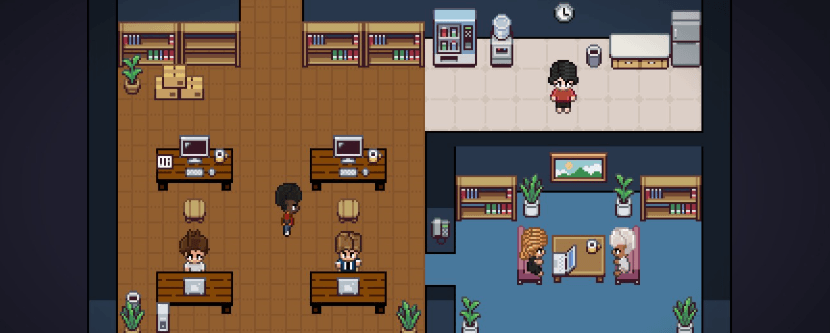
Your AI Agents Now Have a Pixel Office
Pixel Agents is a VS Code extension that turns Claude Code into a living pixel world. Each agent walks, sits at a desk, types, reads, and waits — depending on what it's actually doing right now.
AI Coding, Visualized
How We Use Pixel Agents
When I run 3-4 Claude Code agents in parallel, I used to lose track of what each one was doing. Pixel Agents turned chaos into a clear picture — I literally see who's writing code, who's searching files, and who's waiting for my input.

Before vs After Pixel Agents
Without Pixel Agents
Terminal tabs pile up — you forget which agent is doing what
No visibility into agent activity until it finishes or asks a question
Agents waiting for input go unnoticed for minutes
Context-switching between multiple terminal sessions kills focus
No fun — just walls of text scrolling in terminals
With Pixel Agents
Each agent is a visible character — you see status at a glance
Real-time animation: typing = writing code, reading = analyzing files
Waiting agents are immediately visible — no missed prompts
One visual dashboard for all agents, zero context-switching
Your coding sessions become a pixel adventure
Get Started in 4 Steps
From installation to a fully animated pixel office in under 5 minutes.
Install the Extension
30 secondsSearch for "Pixel Agents" in VS Code Extensions marketplace and click Install. Requires VS Code 1.105.0 or newer.
Ensure Claude Code CLI is Ready
Already done?Pixel Agents reads Claude Code's JSONL transcripts from ~/.claude/projects/. Make sure Claude Code CLI is installed and authenticated.
Launch an Agent
1 clickClick the "+ Agent" button in the Pixel Agents panel. This opens a Claude Code terminal, and a pixel character appears in the office.
Watch Your AI Team Work
Real-timeGive tasks to your agents. Their pixel characters animate in real-time: walking to a desk to write code, reading files, running commands, or waiting for your input.
Pixel Agents is a lightweight VS Code extension that visualizes AI coding agents as animated pixel characters. It doesn't modify Claude Code or connect to it via API — it observes the JSONL transcript files that Claude Code creates in ~/.claude/projects/. Every 500ms, the extension reads new lines and maps tool calls to character animations.
New to Claude Code? Read our Mastering Claude guide
Lightweight game loop — zero impact on your coding performance
GitHub Repository
Pixel Agents is fully open-source. Clone the repo, explore the code, contribute, or just install the extension directly from VS Code Marketplace. Everything you need to get started is in the README.
Quick Install
Set Up Pixel Agents
Step-by-step guide to getting your pixel office running.
01.Install VS Code 1.105.0+
Make sure you have the latest version of VS Code installed. Pixel Agents requires version 1.105.0 or newer for the Webview API features it uses.
Key Features
Tech Under the Hood
The Result: Full Visibility
With Pixel Agents, you transform a chaotic multi-agent workflow into a clear, visual experience. No more forgotten terminals, missed prompts, or lost context. Your AI team is right there on screen — and it looks cool while working.
Ready to Build Real AI Systems?
This guide is just the beginning. Our courses take you from zero to production — with structured curriculum, practical projects, and expert guidance.
Comments